Chrome Keeps Running After You Close It? Turn Off Background Apps
- Chrome still appears in Task Manager after you close every window
- A Chrome icon stays in the system tray when the browser looks closed
- You get Chrome notifications even though Chrome isn't open
chrome://settings/system and switch off Continue running background apps when Google Chrome is closed. With it on, Chrome can keep working in the background after you close its windows. In our fresh test profile the switch was already off, so we could not measure the difference ourselves.What this test does and doesn't cover
Procedure checked
- Location of "Continue running background apps when Google Chrome is closed" in Settings → System
- The switch was off in a fresh profile
Result checked
Not tested in this run
Side effects checked
Not tested in this run
Not tested
- Task Manager or the system tray before and after (our fresh profile had no background apps)
- Which extensions or apps turn the switch on
Screenshots come from our own runs unless a step is marked otherwise.
When to use this
Use it when Chrome seems to keep running after you close it: you still see Chrome in Task Manager, a Chrome icon stays in the system tray next to the clock, or the PC doesn't get faster after closing Chrome. Chrome keeps running if this setting is on and an app or extension wants to work in the background, for example to show notifications. From official docs, not tested here
Steps
Open System settings
Chrome menu (⋮) → Settings → System, or paste chrome://settings/system.
The first switch is Continue running background apps when Google Chrome is closed (outlined). In our fresh test profile it was off.
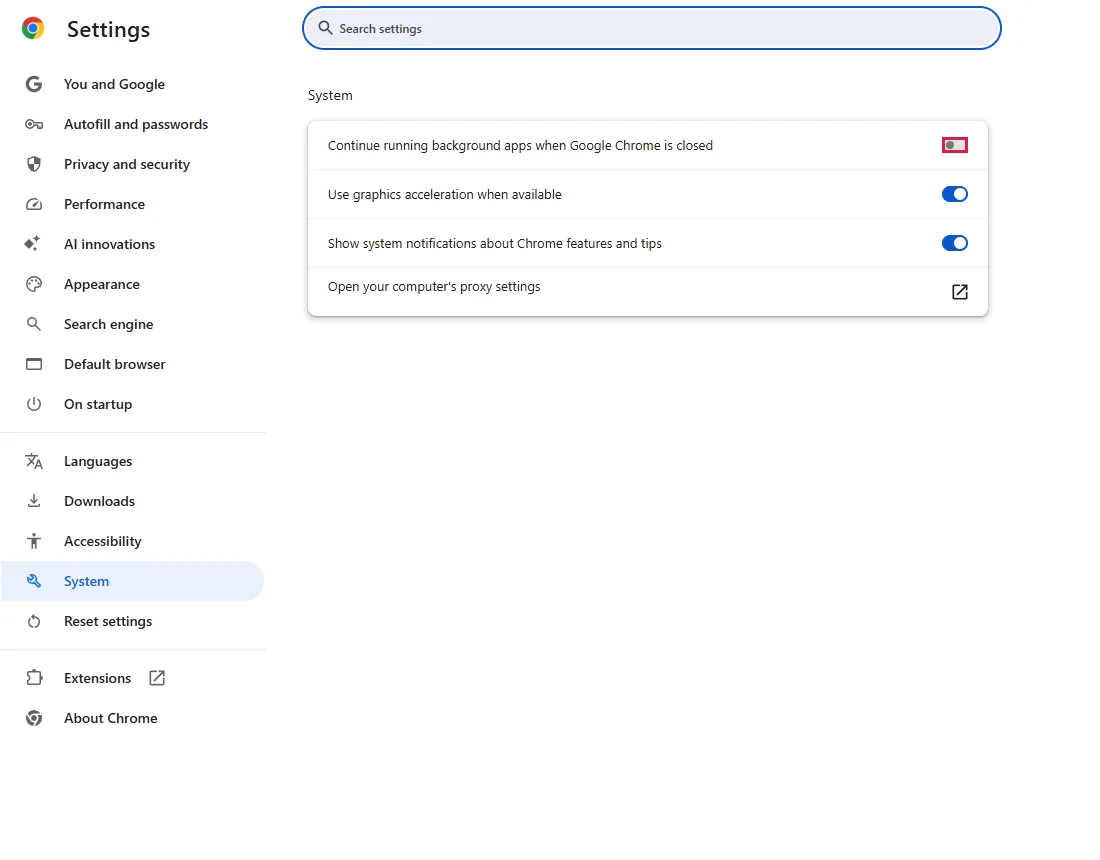
Google's documentation for this setting says it starts off unless a policy sets it.
Turn it off if it is on
Click the switch so it is off. The change is saved immediately.
Close Chrome and check
Close every Chrome window, including other Chrome profiles and windows on other desktops. Wait a few seconds, then open Task Manager (Ctrl+Shift+Esc). If Google Chrome is still listed, see the questions below. From official docs, not tested here
Common questions
Will this reduce memory use or improve battery life?
It can help when something was actually running in the background. If the switch was already off, it isn't the reason Chrome keeps using memory. We did not measure memory or battery use. From official docs, not tested here
Will I miss anything?
Background features that need Chrome to keep running, for example notifications from web apps while Chrome is closed, stop until you open Chrome again. From official docs, not tested here
Chrome still runs after closing
Check for a Chrome window you missed (another profile, another desktop) or an installed web app that is still open. If Chrome disappears and comes back later, note what you did just before; that points to the cause. From official docs, not tested here
Why does Chrome start when I sign in to Windows?
According to Google's documentation for this setting, when it is on, Chrome starts a background process when you sign in and shows an icon in the system tray. Turn the switch off to stop this. To quit the current session only, right-click Chrome's tray icon and choose to exit. From official docs, not tested here
The switch is greyed out and I can't change it
A policy may control this setting; Chrome settings can't change it then. Check chrome://management to see whether Chrome is managed, and chrome://policy for BackgroundModeEnabled. From official docs, not tested here
If it didn't help
| Situation | What to check |
|---|---|
| Chrome is slow even when open | Too many tabs or extensions; also check hardware acceleration for display problems |
| Chrome opens by itself when you sign in to Windows | Turn off background apps (step 2), then check Windows startup apps. From official docs, not tested here |
Related guides
Sources
Chrome Enterprise policy list: BackgroundModeEnabled
How we make guides: we run each step in a real browser or operating system, capture every screen, and have a person review the result. AI assists with drafting.