How to Turn Off Hardware Acceleration in Chrome (Black or Flickering Video)
- Video plays as a black screen in Chrome but you still hear sound
- The screen flickers or tears while scrolling or watching video
- Chrome shows graphics glitches that other apps don't
chrome://settings/system), switch off Use graphics acceleration when available, then click the Relaunch button that appears next to it. The switch was on in our fresh test profile. Turn it back on if nothing improves, because acceleration usually helps performance.What this test does and doesn't cover
Procedure checked
- Switch location; it was on in our fresh test profile
- A Relaunch button appears after switching it off
Result checked
Not tested in this run
Side effects checked
Not tested in this run
Not tested
- Chrome after relaunch (chrome://gpu)
- Whether it fixes black or flickering video on a given graphics card
Screenshots come from our own runs unless a step is marked otherwise.
When to use this
Common symptoms where this is worth trying: video plays with sound but a black picture, the page flickers or shows blocks of garbage, or Chrome's window goes black. Graphics acceleration hands drawing work to your graphics card; a driver problem there can cause exactly these symptoms. From official docs, not tested here
Updating your graphics driver is the longer-term fix; turning acceleration off is a quick test. From official docs, not tested here
Steps
Open System settings
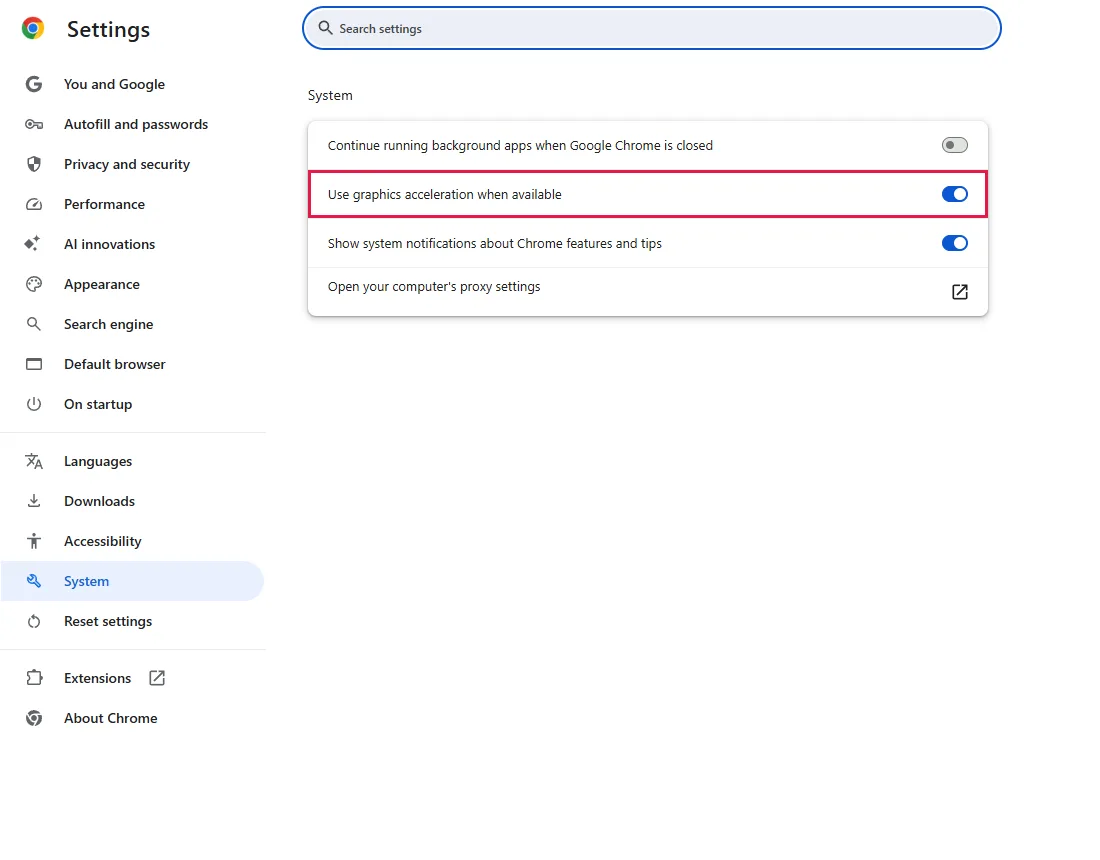
Chrome menu (⋮) → Settings → System, or paste chrome://settings/system into the address bar.
The switch Use graphics acceleration when available (outlined) was on in our fresh profile.
Turn it off and relaunch
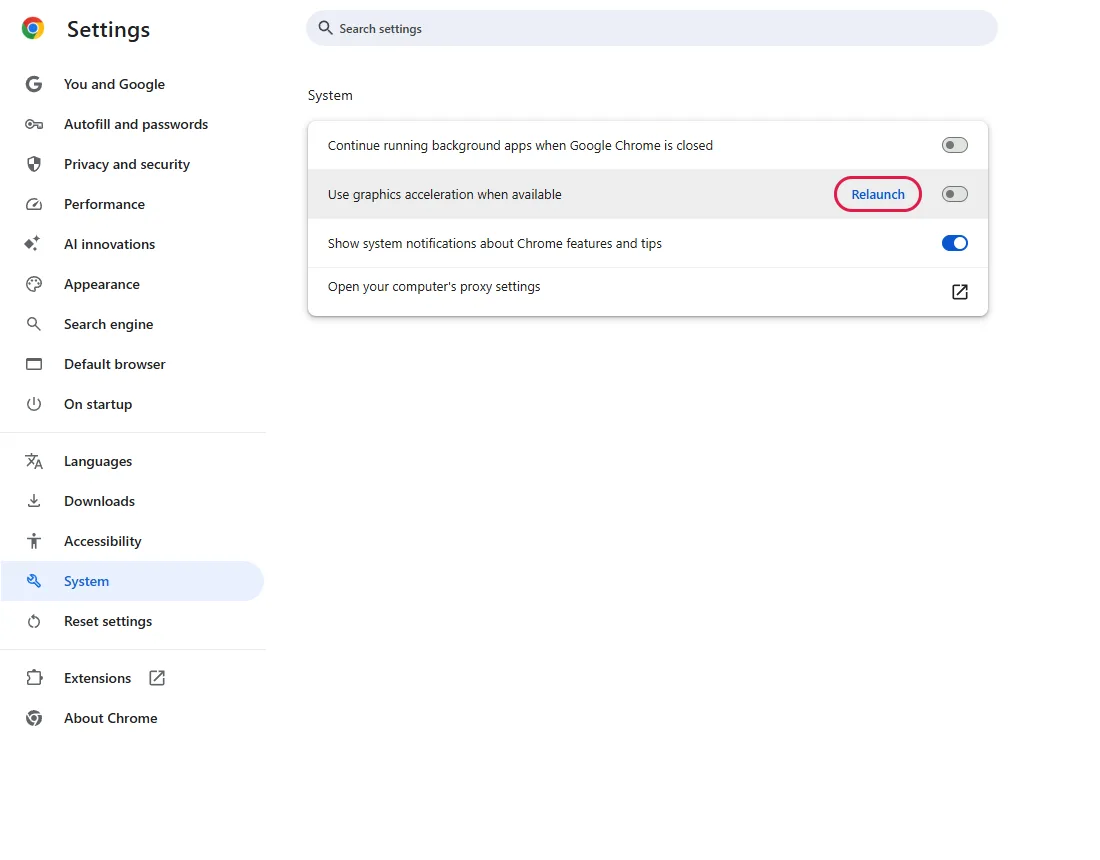
Click the switch to turn it off. A Relaunch button appears next to it; the change takes effect after Chrome restarts. Save anything you're typing in other tabs, then click Relaunch.
Test the video again
Open the page that had the problem. If it plays normally now, acceleration was involved; update your graphics driver and try turning acceleration back on later.
Common questions
Will Chrome get slower?
Possibly. Without acceleration, more drawing work goes to the processor, so video and animations may use more CPU. If turning it off didn't help, turn it back on. From official docs, not tested here
How do I check the change worked?
After relaunching, open chrome://gpu; the "Graphics Feature Status" list shows which features are hardware accelerated. We didn't capture this page in our test. From official docs, not tested here
Chrome's window is completely black and I can't reach Settings
Exit Chrome completely, including any Chrome icon in the system tray. Then press Win+R, type chrome --disable-gpu and press Enter. This launch turns off GPU hardware acceleration, so you may be able to reach Settings, switch it off there and relaunch. From official docs, not tested here
The switch is greyed out
Your organisation may control this setting by policy. Open chrome://management to see whether Chrome is managed. From official docs, not tested here
If it didn't help
| Situation | What to check |
|---|---|
| Only one site's video fails | Try another browser. If it fails there too, the problem may be the site or the video file. |
| Problem persists after relaunch | Turn acceleration back on and update your graphics driver from the PC or graphics card maker. From official docs, not tested here |
| Pages look outdated rather than black | That's usually cache, not graphics: Clear Chrome's cache without signing out. |
Related guides
Sources
Google Chrome Help: Fix videos & games that won't play
How we make guides: we run each step in a real browser or operating system, capture every screen, and have a person review the result. AI assists with drafting.